
If you want to learn how to publish a book on Amazon, the path is simpler than traditional publishing but less casual than uploading a document and hoping readers appear. Amazon KDP lets you publish Kindle ebooks, paperbacks, and hardcovers without a traditional publisher, but the book still needs a finished manuscript, clean formatting, a cover, accurate metadata, pricing, tax setup, and a realistic launch plan.
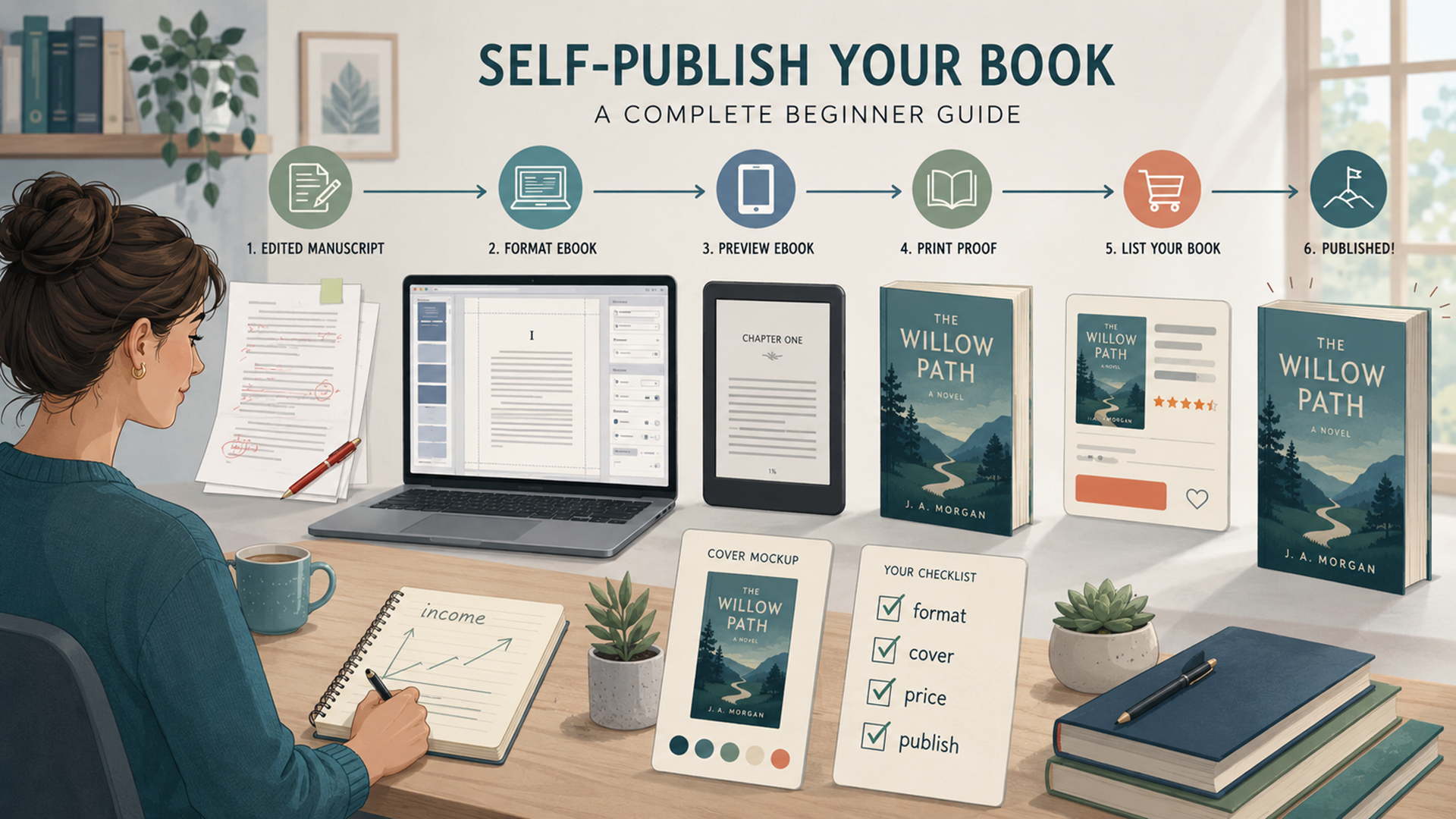
The beginner mistake is jumping straight into the KDP upload screen. That is too late to solve most problems. The better sequence is: finish the book, format it, preview it, prepare the cover, set up KDP, choose metadata carefully, price it, review every proof, then publish.
How to publish a book on Amazon: the quick answer
Amazon’s Kindle Direct Publishing platform lets authors self-publish ebooks, paperbacks, and hardcovers for free. KDP creates the Amazon product detail page, gives you access to Amazon marketplaces, and lets you keep rights to your book. Amazon’s own help page says KDP supports Kindle ebooks plus paperback and hardcover print books, while excluding formats such as magazines, periodicals, calendars, and spiral-bound books.
The full beginner path looks like this:
- Choose the book format: ebook, paperback, or ebook plus paperback.
- Finish and edit the manuscript before formatting.
- Use Kindle Create for a reflowable ebook or ebook-plus-print workflow when it fits your book.
- Export a publishable Kindle Package Format file, usually KPF, for KDP upload.
- Create or upload a cover that meets ebook or print requirements.
- Set up your KDP account, payment method, tax profile, and identity details if requested.
- Add title, subtitle, contributors, description, keywords, categories, age range, and rights.
- Choose pricing, royalty options, territories, and whether to enroll the ebook in KDP Select.
- Preview the book carefully before submitting.
- Publish, wait for KDP review, then market the book after it goes live.
Best beginner setup: publish a Kindle ebook first, then add a paperback once the ebook file, description, keywords, and cover are clean. If your book is text-heavy, Kindle Create can help you format the ebook and prepare a print-friendly file from the same project.
What Amazon KDP actually lets you publish
KDP is not only for Kindle ebooks. Amazon says KDP supports ebooks, paperbacks, and hardcovers. For a beginner author, the most practical starting formats are ebook and paperback. Hardcover is useful for some nonfiction, gift books, journals, premium editions, and special audience cases, but it adds more print-proofing decisions.
| Format | Best for | Main file work | Beginner warning |
|---|---|---|---|
| Kindle ebook | Novels, nonfiction, guides, essays, memoirs, short books, digital-first publishing. | Reflowable manuscript file, Kindle Create/KPF or EPUB, ebook cover image. | Formatting must work across phones, tablets, and Kindle e-readers. |
| Paperback | Nonfiction, workbooks, novels, textbooks, poetry, manuals, author copies, in-person selling. | Interior file, trim size, margins, print cover PDF with front, spine, and back. | Print proofing is less forgiving than ebooks; margins, page count, and spine width matter. |
| Hardcover | Premium editions, gift books, durable nonfiction, special launches. | Print-ready interior and hardcover cover PDF. | More expensive for readers, more sensitive to print-cost math, and not needed for every book. |
If your goal is speed and learning, do not start with every format at once. Start with ebook plus paperback, then add hardcover only if the book’s audience would actually pay for it.
The zero-to-publishing map
Most KDP tutorials begin inside Amazon. That skips the hardest part: turning a book idea into a book file worth publishing. A stronger zero-to-publishing plan has four phases.
| Phase | What you do | What “done” looks like |
|---|---|---|
| 1. Book development | Choose the reader, promise, structure, chapters, examples, and finish the manuscript. | A complete draft with a beginning, middle, end, and a clear reader benefit. |
| 2. Editing and proofing | Revise structure, fix weak sections, clean grammar, check facts, and remove filler. | A manuscript you would be comfortable having a stranger review publicly. |
| 3. Formatting and packaging | Use Kindle Create or another tool, prepare the cover, preview the ebook and print version. | Upload-ready files: manuscript/interior file plus cover files. |
| 4. KDP setup and launch | Create the book in KDP, add metadata, choose categories and keywords, price it, publish, then promote. | A live Amazon listing with clean metadata, tested files, and a simple launch plan. |
If your book is research-heavy, nonfiction, or built from scattered notes, a structured planning process helps. Jivaro’s Research Gap-to-Paper Workflow Kit is built for research-style drafting, source extraction, literature synthesis, claim checking, outlining, and manuscript preparation. It is not a one-click book generator, but the same workflow discipline helps if you are turning an idea, notes, PDFs, or a partial draft into a serious nonfiction manuscript.
Prepare the manuscript before opening Kindle Create
Kindle Create is a formatting tool, not a rescue tool for an unfinished book. Before importing anything, clean the manuscript in Word or a compatible editor.
For a text-heavy book, your manuscript should have:
- a clear title page
- consistent chapter titles
- front matter such as copyright page, dedication, or introduction if needed
- body chapters with consistent headings
- back matter such as acknowledgments, author note, sources, or next steps
- no manual spacing tricks used to fake layout
- no random font changes unless intentional
- images inserted at appropriate resolution if the book includes visuals
- facts, quotations, names, and references checked before upload
For fiction, the most common structure is simple: title page, copyright page, dedication or epigraph if needed, chapters, acknowledgments, author note, and links to other books or newsletter sign-up if appropriate. For nonfiction, readers usually need a stronger table of contents, clear headings, references or source notes, and an introduction that explains who the book is for.
Do not format the book like a school essay. Readers do not want wide double-spaced pages, inconsistent indents, or giant chapter titles. Use simple chapter breaks, clean headings, and a style that survives conversion.
How to use Kindle Create before publishing
Kindle Create is Amazon’s free formatting app for PC and Mac. Amazon says it can turn a completed manuscript into three book types: reflowable books, interactive print replica books, and comics with Guided View. For most authors writing novels, essays, memoirs, and standard nonfiction, the reflowable book path is the one to understand first.
Amazon lists Windows 10 or later and macOS 10.15 or later support, with 8 GB of RAM recommended and 4 GB minimum. Kindle Create can import DOC, DOCX, or PDF depending on the book type, and Amazon says KPF is the preferred export format for Kindle ebook and print books prepared through Kindle Create.
Pick the right Kindle Create project type
| Kindle Create type | Source file | Use it for | Avoid it when |
|---|---|---|---|
| Reflowable book | DOC or DOCX | Novels, memoirs, essays, most nonfiction, standard text-heavy books. | Your layout depends on exact page position, fixed charts, or textbook-style design. |
| Print Replica | Textbooks, travel books, cookbooks, and books where preserving layout matters. | You need readers to resize text freely across all devices. | |
| Comics with Guided View | PDF or images | Comics, graphic novels, and panel-based reading experiences. | Your book is mostly prose or standard nonfiction. |
Kindle Create workflow
- Download and install Kindle Create from Amazon’s KDP help page.
- Open Kindle Create and choose a new project.
- Select the correct book type, usually reflowable for text-heavy books.
- Import your DOC or DOCX file.
- Review automatically detected chapter titles.
- Apply styles and themes consistently.
- Add or review the table of contents.
- Check images, chapter starts, headings, and spacing.
- Use Preview to test the book on phone, tablet, and Kindle-style views.
- Export the publishable KPF file for KDP.
- Save the Kindle Create project file separately so you can revise later.
Amazon’s Kindle Create guidance says the app can build a table of contents, apply themes, edit text, add or adjust images, preview the ebook, and create a file to publish to KDP. It also says Kindle Create’s KPF file is for publishing, while the project file should be kept for future updates.
What Kindle Create does not do
Kindle Create does not write the book, edit the argument, design the cover, guarantee sales, or make bad source formatting disappear. It also does not handle cover formatting. Amazon’s Kindle Create help specifically lists cover formatting as unsupported in the Kindle Create feature chart, so treat the cover as a separate file workflow.
Ebook, paperback, and hardcover decisions
The cleanest beginner plan is usually ebook plus paperback. The ebook gives you the fastest digital path. The paperback gives readers a physical option, lets you order author copies, and can make nonfiction feel more substantial. Hardcover is a later upgrade unless the book’s audience expects a premium edition.
| Decision | Recommended beginner choice | Why |
|---|---|---|
| First format | Kindle ebook | Fastest to publish, easiest to update, no print cost, broad Kindle marketplace access. |
| Second format | Paperback | Adds physical credibility and reader choice without requiring a traditional print run. |
| Hardcover | Optional | Best for premium nonfiction, gift books, or special editions, but not essential for most first authors. |
| Formatting tool | Kindle Create for standard text-heavy books | Simple, free, Amazon-supported, and designed for KDP upload. |
| Launch order | Prepare both, publish when both preview cleanly | Readers see both options early, but you avoid rushing the paperback before the print proof is clean. |
For paperback and hardcover, remember that print is physical. Page count, trim size, ink type, paper, margins, bleed, and cover spread matter. Amazon calculates print royalties by subtracting printing costs from a royalty-rate portion of the list price, so print pricing is not just a marketing decision. It is also a cost decision.
Prepare the cover as a separate job
Readers judge covers quickly. A strong cover does not need to be expensive, but it must look like it belongs in the category. A thriller should not look like a workbook. A business book should not look like a fantasy novel. A cookbook, poetry collection, and children’s book all have different cover expectations.
For Kindle ebooks, the cover is a front-cover image uploaded separately from the manuscript. Amazon’s ebook cover guidance lists minimum dimensions of 1,000 pixels in height and 625 pixels in width, an ideal height-to-width ratio of at least 1.6:1, and a file size under 50 MB. Amazon also recommends minimal compression for best results.
For paperback and hardcover, the cover is more complicated. Amazon’s print cover guidance says the cover must be a single PDF that includes back cover, spine, and front cover as one image. The print cover has to match the trim size, page count, paper type, and bleed setup.
| Cover type | What you upload | Main risk |
|---|---|---|
| Kindle ebook cover | Front-cover image file. | Looks unprofessional as a thumbnail or fails size/ratio requirements. |
| Paperback cover | Full-spread PDF: back cover, spine, front cover. | Wrong spine width, text too close to trim edge, barcode area conflicts, missing bleed. |
| Hardcover cover | Full-spread hardcover PDF. | Same print-cover risks, with higher reader expectations and higher print costs. |
If you are not a designer, use Amazon’s Cover Creator, a professional template, or a designer who understands KDP print files. Do not upload a social media graphic and assume it will work as a book cover.
Set up your KDP account before launch week
Do not wait until the day you want to publish to finish KDP account setup. Amazon requires payment and tax information, and it may ask for identity verification. Amazon’s tax profile page says KDP must receive and validate tax identity before you can update existing books or publish new books in the Kindle store.
Set up these items early:
- KDP account login
- publisher or author name
- business or individual tax identity
- bank account or supported payment method
- two-step verification
- identity information if KDP requests verification
- author photo and bio if you plan to use Author Central after publication
For non-U.S. publishers, tax setup matters. Amazon’s KDP tax page says royalties are considered taxable income in the U.S. and explains that non-U.S. publishers may generate a Form W-8 through the tax profile process. It also says the default withholding rate is 30%, though a reduced rate may be available if the publisher’s country of tax residence has a U.S. tax treaty.
Tax note: This is a publishing guide, not tax advice. If you are unsure whether to publish as an individual, sole proprietor, LLC, corporation, or foreign publisher, ask a qualified tax professional before you publish.
Write the title, description, keywords, and categories like a reader will search
Your Amazon listing is not only a checkout page. It is the sales page. The title, subtitle, description, categories, keywords, cover, reviews, and sample all shape whether a reader trusts the book.
Title and subtitle
Your title should be memorable and accurate. Your subtitle should clarify the promise. Avoid stuffing keywords into the title. Amazon’s keyword guidance says not to repeat information already covered elsewhere in metadata, such as title or contributors, and warns against misleading metadata.
Weak nonfiction title:
Remote Work Book
Stronger nonfiction title:
Work From Anywhere
A Practical Guide to Remote Income, Travel, and Staying Employable
Weak fiction title:
The Mystery Book
Stronger fiction positioning:
The Last Ferry Home
A Small-Town Mystery About a Missing Heiress and the Detective Who Came Back Too Late
Description
The description should tell the reader what the book is, who it is for, and why it is worth reading. Do not use the description to brag vaguely. Use it to frame the problem, promise, story, or transformation.
For nonfiction, a good description usually includes:
- the problem the reader has
- what the book helps them do
- what is inside the book
- who the book is for
- what makes the approach specific
For fiction, it usually includes:
- main character
- central conflict
- stakes
- genre promise
- tone or reader appeal
Keywords
KDP lets authors add up to seven keywords or short phrases. Amazon recommends thinking like a reader, searching the Amazon store before publishing, and avoiding irrelevant or misleading terms. Good keywords can include setting, character types, role, plot themes, or tone for fiction; for nonfiction, they should capture the problem, audience, method, or use case the title cannot fully hold.
| Book type | Useful keyword direction | Bad keyword direction |
|---|---|---|
| Romance novel | small town romance, single dad, second chance, slow burn | best book ever, Kindle Unlimited, famous author names |
| Self-help book | habit tracking, confidence workbook, anxiety journaling, morning routine | new, on sale, bestseller, life-changing |
| Business guide | freelance pricing, client proposals, remote work systems, solopreneur operations | money, success, Amazon, business book |
| Research-based nonfiction | literature review, research writing, academic publishing, citation workflow | PhD guaranteed, publish fast, journal acceptance guaranteed |
Categories
Amazon’s category guidance says to pick accurate categories, research your genre, and balance popularity with relevance. KDP currently lets authors select up to three categories, and Amazon warns that irrelevant categories create a poor shopping experience and may be changed.
A simple rule: choose the shelf where your ideal reader would expect to find the book. If a reader would feel tricked after clicking, the category is wrong.
Pricing and royalties: what KDP pays and what to watch
KDP money has three pieces: ebook royalties, print royalties, and optional Kindle Unlimited page-read earnings through KDP Select. None of them guarantees income. They only define how you are paid if the book sells or is read through eligible programs.
Kindle ebook royalties
Amazon’s ebook royalty page says authors can choose between 35% and 70% royalty options for each ebook. The 35% option pays 35% of list price minus applicable VAT. The 70% option pays 70% of list price minus applicable VAT and delivery costs for eligible books sold in eligible territories, with 35% applying outside those territories.
The 70% option is attractive, but it has requirements. Price, territory, file size, rights, public-domain status, and price matching can affect whether the higher royalty applies. For many beginner nonfiction and fiction ebooks, the common strategy is to price within the 70% range when eligible, but the right price depends on genre, length, reader expectations, author platform, and launch strategy.
Paperback royalties
Amazon’s paperback royalty page says paperback royalty is calculated as:
(Royalty rate × list price) – printing costs = royalty
KDP now offers 50% or 60% royalty rates on paperbacks sold through supported Amazon marketplaces, depending on list price and marketplace, and printing costs depend on trim size, page count, ink type, and marketplace. Expanded Distribution uses a lower royalty-rate calculation.
Hardcover royalties
Amazon’s hardcover royalty page uses the same general idea: royalty rate times list price, minus printing costs. KDP says hardcover royalties can use 50% or 60% depending on list price and marketplace, with printing costs depending on page count, ink type, and marketplace.
Payment timing
Amazon’s payment page says royalties are paid monthly, approximately 60 days after the end of the month in which the sale was reported, or 90 days for Expanded Distribution, as long as the payment threshold is met. Direct deposits can take one to five business days after the payment date to appear, while wire and check timing varies.
| Money topic | What KDP says | What authors should remember |
|---|---|---|
| Ebook royalties | 35% or 70% options, with rules and delivery costs affecting the 70% option. | Do not assume every sale earns 70%. Check eligibility and pricing rules. |
| Paperback royalties | 50% or 60% royalty rate depending on list price and marketplace, minus printing costs. | Long books with high page counts need careful print pricing. |
| Hardcover royalties | 50% or 60% royalty rate depending on list price and marketplace, minus printing costs. | Hardcover can look premium but may be too expensive for some readers. |
| KDP Select / Kindle Unlimited | Eligible enrolled ebooks can earn from Kindle Unlimited page reads. | Enrollment affects exclusivity for the ebook, so understand the tradeoff. |
| Payments | Monthly, usually about 60 days after the sale month; Expanded Distribution can be 90 days. | Do not plan on same-month cash flow from new sales. |
| Tax setup | KDP requires validated tax identity before publishing new books. | Finish tax setup before launch week. |
KDP Select, Kindle Unlimited, and exclusivity
KDP Select is optional. Amazon describes it as a free 90-day program for Kindle ebooks only. When you enroll a Kindle ebook in KDP Select, Amazon says it is automatically included in Kindle Unlimited and becomes eligible for promotional tools such as Free Book Promotions and Kindle Countdown Deals.
The tradeoff is exclusivity. Amazon’s KDP start-publishing page explains that the only circumstance where your book cannot be sold on other platforms is when you enroll your ebook in KDP Select, which makes that ebook exclusive to Amazon. This applies to the ebook, not necessarily your paperback or hardcover.
| Choice | Pros | Tradeoffs |
|---|---|---|
| Enroll ebook in KDP Select | Kindle Unlimited access, promotional tools, simpler Amazon-first strategy. | Ebook exclusivity to Amazon during the enrollment period. |
| Do not enroll | Can sell ebook through other stores and platforms. | No KU page-read earnings or KDP Select promotional tools. |
| Amazon-only print but wide ebook | Paperback can still be on Amazon while ebook sells elsewhere. | Requires more metadata, files, and platform management. |
If you are a new author with no audience, KDP Select can be useful because Kindle Unlimited readers may be more willing to try you. If you already sell through your own site, newsletter, Gumroad, Shopify, Apple Books, Kobo, or direct bundles, exclusivity may be too restrictive.
Kindle publishing as work from home
Self-publishing through Amazon can count as a work-from-home path because the core work can be done remotely: writing, editing, formatting, cover coordination, uploading, pricing, marketing, and customer-facing author updates. You do not need a traditional publisher, warehouse, bookstore relationship, or office to sell your own writing.
That does not make it passive or guaranteed. A book is a product. Most books need positioning, editing, cover design, launch effort, and ongoing marketing. Some authors earn meaningful royalties. Many earn little or nothing. The work-from-home advantage is access: KDP lowers the barrier to publishing, but it does not remove the need to make something readers want.
| Remote-work task | What you do from home | Skill it builds |
|---|---|---|
| Writing | Draft chapters, examples, scenes, explanations, worksheets, or essays. | Communication and subject clarity. |
| Editing | Revise structure, remove filler, fact-check, proofread, or hire editors remotely. | Quality control and judgment. |
| Formatting | Use Kindle Create or other formatting tools to prepare ebook and print files. | Digital production. |
| Publishing operations | Manage KDP metadata, pricing, categories, keywords, and updates. | Platform operations and SEO thinking. |
| Marketing | Build a newsletter, write blog posts, run ads, pitch podcasts, or publish excerpts. | Audience building and sales. |
| Portfolio building | Use the book as proof of expertise for consulting, speaking, teaching, or freelance work. | Authority and business development. |
If you are exploring remote income more broadly, Jivaro’s guide on choosing the right remote job is useful because publishing is only one path. Writing and publishing can pair well with research, consulting, content strategy, editing, AI-assisted workflows, and digital products.
AI-generated content, originality, and copyright risk
Many new authors use AI tools for brainstorming, outlining, editing, summaries, market research, cover concepts, or draft feedback. That can be useful, but KDP has specific disclosure rules.
Amazon’s KDP content guidelines require authors to inform Amazon of AI-generated content when publishing a new book or editing and republishing an existing one. Amazon defines AI-generated content as text, images, or translations created by an AI-based tool, even if the author later edits the output. Amazon says AI-assisted content does not need to be disclosed when the author created the content and used AI tools only to edit, refine, error-check, brainstorm, or otherwise improve it.
Amazon also says authors are responsible for verifying that AI-generated or AI-assisted content follows content guidelines and respects intellectual property rights. That is the practical part: do not upload unchecked AI output, fake citations, copied passages, trademarked characters, or images you do not have rights to use.
| Use of AI | How Amazon frames it | Author responsibility |
|---|---|---|
| AI writes actual passages, translations, cover art, or interior images | AI-generated content that must be disclosed in KDP. | Verify rights, accuracy, quality, and compliance before publishing. |
| AI helps brainstorm a chapter outline | AI-assisted if the author creates the final content. | Do not let the outline create fake claims or stolen structure. |
| AI checks grammar or clarity | AI-assisted and not required to be disclosed under Amazon’s described distinction. | Review every change yourself. |
| AI invents sources or statistics | Risky and likely unacceptable if false or misleading. | Delete, verify, or replace with real sources. |
| AI-generated cover image | AI-generated image content. | Disclose as required and confirm commercial-use rights. |
A safe author workflow is to keep an AI-use log. Track which tools helped with brainstorming, editing, images, translation, or text generation. Keep proof of licenses for fonts, images, illustrations, and cover assets. If you ever need to update the book or answer a platform question, you will not be guessing.
Publish, review, and what happens after you click the button
When you submit the book, KDP review begins. Amazon’s KDP Jumpstart publishing page says KDP checks books during review to make sure they meet formatting and content guidelines. While a book is in review, it is locked for changes.
Amazon’s book status guidance says that after submission, it can take up to three business days for a book to be live on Amazon. Low-content books, such as journals or notebooks, can take up to ten business days. The time depends on book type and review outcome.
Before clicking publish, check:
- title and subtitle spelling
- author name and contributors
- book description formatting
- categories and keywords
- rights and territories
- ebook preview on phone, tablet, and Kindle-style view
- paperback preview page by page
- cover crop, spine, back cover, and barcode space
- pricing and royalty selection
- KDP Select enrollment decision
- AI-generated content disclosure if applicable
- tax and payment setup
For print books, be extra careful with title, subtitle, and primary author name. Amazon’s update guidance says paperback and hardcover title, subtitle, and primary author name can be edited only within 72 hours of initial publication after the title is no longer in review; after that, those fields are locked and may require a new edition.
A practical launch plan for first-time KDP authors
Publishing is not the launch. Publishing only makes the listing live. A basic launch plan gives readers a reason to find the book.
Before publication
- Build a simple book landing page or blog post.
- Create a short author bio and author photo.
- Prepare three to five short posts explaining who the book is for.
- Ask early readers for honest feedback before launch, not fake reviews.
- Prepare a launch email for your list if you have one.
- Collect useful excerpts or quotes from the book.
- Decide whether KDP Select fits your ebook strategy.
Launch week
- Check that the product page is live and formatted correctly.
- Test the ebook sample.
- Order or review print proof copies if you are using paperback.
- Post the book with a specific reader-focused reason to care.
- Ask readers to leave honest reviews only after they have read the book.
- Track sales, page reads, and ad spend if you run ads.
After launch
- Update the description if readers are misunderstanding the book.
- Fix formatting or typo issues as they surface.
- Write content around the book’s topic.
- Pitch podcasts, newsletters, blogs, or communities where the book fits.
- Build a second book or companion product only after learning what readers respond to.
If your manuscript or launch materials are too long to paste cleanly into an AI editor, newsletter tool, or social thread planner, splitting long text into smaller chunks can make editing, summarizing, and repurposing easier without losing context.
Common KDP mistakes beginners make
| Mistake | Why it hurts | Better approach |
|---|---|---|
| Uploading an unfinished draft | Bad early reviews can damage trust quickly. | Edit, proof, and use beta readers before publishing. |
| Skipping Kindle Create preview | Formatting errors show up differently across devices. | Preview on phone, tablet, and Kindle-style views. |
| Using a weak cover | Readers may never click even if the book is good. | Match the genre and make the cover readable as a thumbnail. |
| Choosing misleading categories | It creates a poor customer experience and can be changed by KDP. | Pick accurate categories where similar books actually belong. |
| Stuffing keywords | Amazon warns against misleading, repetitive, or irrelevant metadata. | Use seven reader-focused phrases that describe the book honestly. |
| Assuming KDP Select is always best | It adds ebook exclusivity during the enrollment period. | Compare KU benefits against wide distribution goals. |
| Pricing print books too low | Printing costs can erase profit. | Use KDP’s royalty and printing-cost preview before publishing. |
| Ignoring AI disclosure rules | KDP requires disclosure for AI-generated text, images, and translations. | Track AI use and disclose when required. |
| Paying a fake KDP service | Scammers impersonate Amazon or promise unrealistic publishing outcomes. | Use official KDP pages and remember KDP itself is free. |
Amazon’s scam-warning page says KDP is a free self-publishing service and does not offer fee-based editing, book design, or marketing services. It also warns that fraudulent companies may falsely claim Amazon or KDP affiliation, pressure authors into paying, or ask for sensitive information. If someone says they are “from KDP” and wants money to publish your book, verify through the official KDP site before doing anything.
FAQ
How much does it cost to publish a book on Amazon?
KDP itself is free to use. Amazon says KDP lets authors self-publish ebooks, paperbacks, and hardcovers for free. Your real costs may come from editing, cover design, formatting help, ISBN decisions, author copies, ads, or marketing services you choose outside KDP.
Do I need Kindle Create to publish on Amazon?
No, but Kindle Create is a strong free option for many beginners, especially for text-heavy books. Amazon says Kindle Create can prepare reflowable ebooks, print replica books, and comics with Guided View, and it exports KPF files for KDP publishing.
Should I publish ebook or paperback first?
If this is your first book, start with ebook plus paperback as your main plan, but do not rush the paperback. The ebook is easier to update, while the paperback needs careful print previewing, trim size, margins, and cover spread checks.
Can I publish a hardcover on KDP?
Yes, KDP supports hardcover books in addition to ebooks and paperbacks. Hardcover is optional for most beginners and makes the most sense when the book has a premium audience, gift value, or a physical-use case.
How much royalty does KDP pay?
For ebooks, Amazon lists 35% and 70% royalty options, with eligibility rules for the 70% option. For paperbacks and hardcovers, Amazon calculates royalty from a 50% or 60% rate depending on list price and marketplace, minus printing costs.
How long does Amazon KDP take to publish a book?
Amazon says books can take up to three business days to become live after submission, while low-content books can take up to ten business days. Review time can vary by book type and whether KDP finds formatting or content issues.
Can Kindle publishing be a work-from-home business?
Yes, it can be part of a work-from-home income path because writing, formatting, publishing, and marketing can all be done remotely. Income is not guaranteed, and authors still need a quality book, clear positioning, and consistent promotion.
Do I have to disclose AI use on KDP?
You must disclose AI-generated text, images, or translations when publishing or republishing through KDP. Amazon says AI-assisted work, such as using AI to brainstorm, edit, refine, or error-check content you created yourself, does not need to be disclosed under its current distinction.
Can I sell my KDP ebook outside Amazon?
Yes, unless you enroll that ebook in KDP Select. Amazon says KDP Select makes the Kindle ebook exclusive to Amazon during the enrollment period. Print formats are a separate issue.
Do I need an ISBN?
Kindle ebooks do not require an ISBN on KDP. Print books have ISBN decisions depending on whether you use a free KDP ISBN, your own ISBN, or an existing ISBN that fits Amazon’s rules. Check KDP’s current ISBN guidance before choosing.
Sources and useful official pages
- Amazon KDP: Start publishing with KDP
- Amazon KDP: Getting started with Kindle Create
- Amazon KDP: eBook royalties
- Amazon KDP: Paperback royalty
- Amazon KDP: Hardcover royalty
- Amazon KDP: KDP Select
- Amazon KDP: Complete Tax Profile
- Amazon KDP: When will I get paid?
- Amazon KDP: Content Guidelines and AI content disclosure
- Amazon KDP: Make your book more discoverable with keywords
- Amazon KDP: Categories
- Amazon KDP: Account security and avoiding scams
The cleanest way to publish on Amazon is not to rush the upload. Finish the manuscript, format it with care, preview every version, make the cover look like it belongs in the category, and treat the KDP listing like a real product page. KDP gives you access. The book still has to earn the reader’s click.