
How to Split Long Text Into Chunks for AI Prompts Fast
Long text is useful until the moment it becomes too long to use. A research note will not fit cleanly into an AI prompt. A draft thread is too big for X or Threads. A long LinkedIn post needs to be broken into a carousel script, comment sequence, or smaller repurposed posts. Even an email, transcript, or product brief can become awkward when a tool, platform, or workflow expects smaller pieces.
That is where text chunking comes in. At its simplest, chunking means splitting one long piece of text into smaller sections that are easier to paste, process, publish, summarize, or reorganize. The trick is not merely cutting text every 1,000 characters. Good chunking keeps the meaning intact, avoids chopping sentences in half, and gives each section enough context to stand on its own.
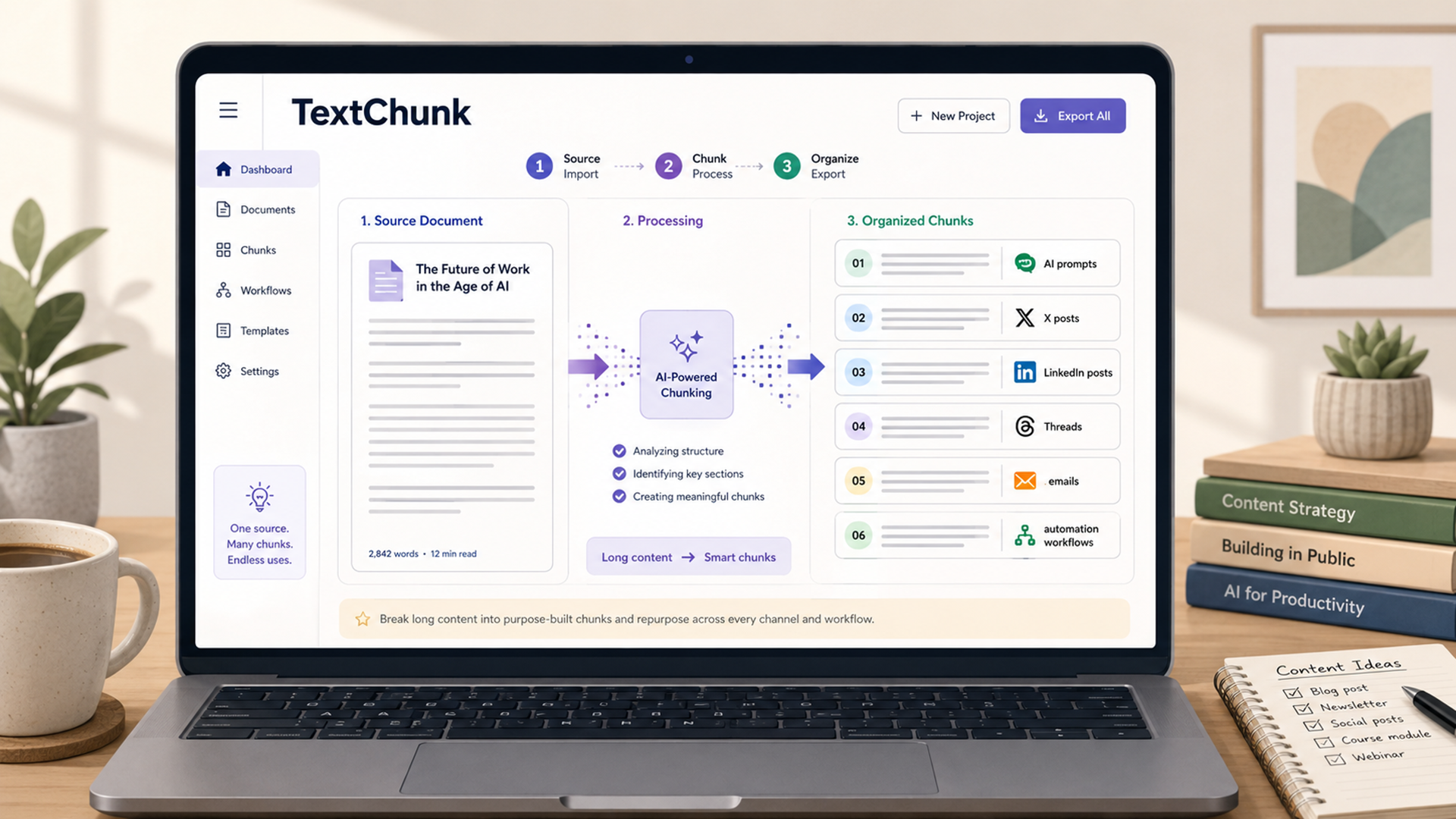
For everyday use, a tool like TextChunk solves the practical problem: paste a long block of text, choose how you want it split, and copy the resulting chunks into your AI tool, social platform, document workflow, or content calendar. This guide explains when to split text, what chunk size to use, how to avoid losing context, and how TextChunk can make the process faster.
Why Long Text Needs to Be Split
Long text creates two different problems: technical limits and attention limits. Technical limits are the hard boundaries set by platforms and tools. X standard posts can contain up to 280 characters, while X longer posts are available only in certain account contexts and can extend far beyond a normal post [1]. LinkedIn posts have a 3,000-character limit [2]. Threads posts are commonly limited to 500 characters, though Meta has also introduced longer text attachments for some extended writing use cases [3].
Attention limits are different. A platform may technically accept 3,000 characters, but that does not mean readers will stay with a dense wall of text. A prompt may fit into an AI tool, but if the request mixes instructions, source material, examples, and output rules in one messy block, the model may miss important details. Chunking solves both problems by making text easier to handle and easier to understand.
This matters for writers, marketers, researchers, students, founders, developers, social media managers, and anyone using AI tools. A 5,000-word transcript can become a summary workflow. A long article can become ten social posts. A product spec can become smaller AI prompts. A legal or technical document can be broken into reviewable sections. The goal is not to make content shorter. The goal is to make it usable.
What Text Chunking Actually Means
Text chunking is the process of dividing content into smaller units while preserving enough context for each unit to remain meaningful. In basic workflows, chunks may be based on character count, paragraph breaks, sentence boundaries, headings, or sections. In more advanced AI workflows, chunking may involve overlap, semantic boundaries, or retrieval systems that split documents before embedding them into a database [4].
For everyday users, the important distinction is between dumb splitting and useful splitting. Dumb splitting cuts text at a fixed character count even if the cut happens in the middle of a sentence or idea. Useful splitting tries to keep chunks readable. A good chunk should usually end at a sentence, paragraph, bullet point, or natural section break.
AI teams care about chunking because retrieval-augmented generation systems often split documents into smaller units before indexing and retrieving them [5]. Tools like Langflow describe split-text components that use settings such as chunk size, separator, and overlap to prepare text for embedding or retrieval workflows [4]. Even if you are not building a RAG system, the same idea applies to normal prompting: smaller, cleaner chunks are often easier to review, summarize, and reuse.
A simple rule works well: split text small enough that the receiving platform can handle it, but large enough that each chunk still carries a complete idea. If a chunk is too small, the reader or AI tool loses context. If it is too large, the original problem returns.
Common Use Cases for Splitting Long Text
The most obvious use case is AI prompting. Someone may have a long document, transcript, policy, interview, or research brief and want ChatGPT, Claude, Gemini, or another AI tool to summarize it. Instead of pasting everything at once, the user can split the source into chunks and process them one at a time. This works especially well when the user gives the model a consistent instruction such as “Summarize this section and wait for the next chunk.”
Social media is another major use case. X threads, LinkedIn posts, Threads posts, newsletters, and caption workflows all benefit from chunking. A single long essay can become a thread. A webinar transcript can become short quote posts. A product announcement can become separate LinkedIn updates for founders, customers, and investors.
Chunking also helps with editing. Long drafts can be hard to improve because every paragraph competes for attention. When you split the text into sections, it becomes easier to check whether each part has a clear purpose. This is useful for blog editing, SEO briefs, academic notes, sales pages, help center articles, and scripts.
Automation is another practical category. People who work with spreadsheets, scripts, browser workflows, or no-code tools often need text in manageable pieces. A giant block of text may break a form, exceed a field limit, or make a workflow hard to debug. Smaller chunks make it easier to test, paste, send, label, and store content reliably.
Recommended Chunk Sizes by Use Case
The right chunk size depends on where the text is going. Platform limits change, and some platforms count links, emojis, line breaks, or Unicode characters differently, so it is smart to stay below the maximum instead of aiming exactly for it. The table below gives practical working ranges.
| Use case | Suggested chunk size | Why it works |
|---|---|---|
| X standard posts | 240–270 characters | Leaves room for links, numbering, edits, and character-count quirks around URLs or emojis [1] |
| Threads posts | 430–490 characters | Stays under the common 500-character limit while leaving room for edits [3] |
| LinkedIn posts | 2,000–2,800 characters | Fits under the 3,000-character limit while encouraging tighter structure [2] |
| AI prompt chunks | 1,500–4,000 characters | Keeps sections manageable while preserving enough context for summary or extraction |
| Email drafts | 1,000–2,500 characters | Useful for turning one long message into a sequence or follow-up campaign |
| Blog repurposing | 800–1,500 characters | Works well for turning sections into social posts, newsletter blurbs, or short scripts |
| RAG-style document prep | Varies by model and retrieval goal | Technical chunking depends on document structure, overlap, and query type [5] |
These ranges are not laws. A poetic thread may need shorter chunks. A technical manual may need larger sections. A LinkedIn post may perform better when split into two posts rather than one maximum-length update. Chunk size is a practical choice, not a moral one.
The best approach is to start with the destination. If the text is going into an AI tool, choose chunks that preserve sections and ideas. If the text is going into social media, choose chunks that are readable and self-contained. If the text is going into automation, choose chunks that fit reliably inside the strictest field or platform in the workflow.
How to Use TextChunk Step by Step
TextChunk is built for the simple version of this problem: you have text that is too long, and you need it split into usable pieces quickly. Instead of manually counting characters, copying paragraphs into separate notes, or guessing where a platform will cut you off, you can use TextChunk as a lightweight splitter.
The workflow is straightforward. Paste your long text into the input area. Choose the chunking size or splitting option that fits your destination. For example, use smaller chunks for X or Threads, medium chunks for LinkedIn, and larger chunks for AI prompt workflows. Then run the split and review the output chunks before copying them into your tool or platform.
- Open TextChunk.
- Paste the full text you want to split.
- Choose a chunk size based on where the text will be used.
- Split the text into smaller parts.
- Review each chunk for cut-off sentences or missing context.
- Copy the chunks into your AI prompt, social post scheduler, document, or workflow.
- Add labels such as “Part 1 of 4” when the reader or AI model needs ordering.
The review step matters. Any text splitter can produce chunks that technically fit a size limit. The human job is making sure the chunks still make sense. If a paragraph is split awkwardly, adjust the original text or move one sentence into the next chunk. The best results come from combining automation with judgment.
How to Chunk Text Without Losing Context
The biggest chunking mistake is cutting the text so aggressively that each piece becomes confusing. This happens often when people split transcripts, technical notes, or long prompts. A chunk may begin with “this approach,” “the second issue,” or “as mentioned above,” but the reader or AI model no longer has the previous sentence. The chunk is short, but it is not useful.
One solution is to add a small amount of context to each chunk. For AI workflows, this can be as simple as a header: “Chunk 2 of 5: Pricing objections from the customer interview.” For social content, it can mean turning each chunk into a self-contained post with its own hook. For documents, it can mean keeping headings attached to the paragraphs below them.
Technical systems sometimes use overlap, where the end of one chunk appears again at the beginning of the next. Langflow’s documentation describes chunk overlap as a way to help maintain context across chunks [4]. Everyday users can apply the same idea manually by repeating a short header, source label, or summary line. You do not need complex software to preserve context.
For AI prompts, use a consistent structure. Tell the model how many chunks are coming, what to do with each chunk, and when to wait. For example: “I will send this document in six chunks. Summarize each chunk in five bullets and wait until I say FINAL before writing the full synthesis.” This prevents the model from trying to conclude too early.
Mistakes to Avoid When Splitting Text
The first mistake is splitting text only by character count. Character count matters, especially for social platforms, but meaning matters more. If a chunk ends in the middle of a sentence, argument, quote, or instruction, the next chunk starts at a disadvantage. Always review the output before publishing or prompting.
The second mistake is forgetting that different platforms count content differently. X’s developer documentation notes that posts can contain up to 280 characters, but not all characters count equally because URLs, emojis, and some Unicode characters have special counting rules [1]. That is why it is safer to chunk below the maximum.
The third mistake is chunking without labels. If you are sending AI prompt chunks, use labels like “Chunk 1 of 5.” If you are posting a thread, use numbering only when it helps the reader follow the sequence. If you are sending internal documents, use descriptive names such as “Customer complaints,” “Pricing notes,” or “Feature requests.”
The fourth mistake is using the same chunk size for every job. A 2,500-character chunk may work well for LinkedIn but feel too large for X or Threads. A 400-character chunk may work for a short post but be annoying for AI document processing. The receiving tool should determine the chunk size.
When TextChunk Is the Fastest Option
TextChunk is most useful when the problem is practical and immediate. You have a long piece of text. You need smaller pieces. You do not want to write code, open a spreadsheet, count characters manually, or guess where to cut. That is exactly the type of workflow TextChunk is meant to speed up.
Use it when repurposing long content. A blog draft can become short social posts. A transcript can become a thread. A research note can become prompt inputs. A long AI output can become smaller sections for review. A messy notes document can become manageable chunks before editing.
TextChunk is also useful for people who work with AI regularly. Long prompts often include source material, instructions, examples, constraints, and desired output format. Splitting the source material from the instructions can reduce confusion. A better workflow is to keep the instruction prompt stable, then feed source chunks one at a time.
For content creators and social media managers, TextChunk helps turn one long idea into a distribution system. Instead of asking “How do I cut this manually?” the better question becomes “What formats can this content become?” A guide can become a LinkedIn post, an X thread, a Threads sequence, an email, a carousel script, and an AI summary.
Turn Long Text Into Usable Pieces
Long text is not the enemy. Unusable long text is. When a document, post, prompt, transcript, or draft is too large for the next step, chunking turns it into something workable. It helps AI tools process material more cleanly, helps social platforms receive content in the right size, and helps writers edit with less overwhelm.
The best chunking strategy is simple: choose the destination, set a realistic size, preserve meaning, label the chunks, and review before publishing or prompting. TextChunk makes that workflow faster by removing the manual cutting and copying that slows people down.
Try it with one piece of text today. Take a long note, article, transcript, or prompt, run it through TextChunk, and see how many useful pieces it becomes. The moment a giant block turns into clean sections, the next step gets easier.
References
- X Help Center and X Developer Platform. “About different types of Posts” and “Counting Characters.”
- LinkedIn Help. “Post and share updates.”
- Time and The Verge. Threads character-limit and text-attachment reporting.
- Langflow Documentation. “Split Text.”
- Databricks Technical Blog. “The Ultimate Guide to Chunking Strategies for RAG Applications.”
- LanceDB. “Chunking Techniques with LangChain and LlamaIndex.”
