
The best VPNs are not all best for the same person. A traveler on hotel Wi-Fi, a privacy-first user, a streaming household, a remote worker, and a technical user who wants custom DNS or WireGuard support should not automatically buy the same VPN.
This guide ranks the VPNs in a people-first way: who each VPN fits, what it costs, what it includes, what the tradeoffs are, and what you should test before trusting it. The shortlist is limited to the VPNs provided for this article: NordVPN, Proton VPN, IPVanish, hide.me, PureVPN, VPN.ac, CactusVPN, and trust.zone.
A VPN can hide your IP address from websites, encrypt traffic between your device and the VPN server, and help protect you on public Wi-Fi. It does not guarantee anonymity, stop every kind of tracking, bypass every restriction, or make prohibited activity acceptable.
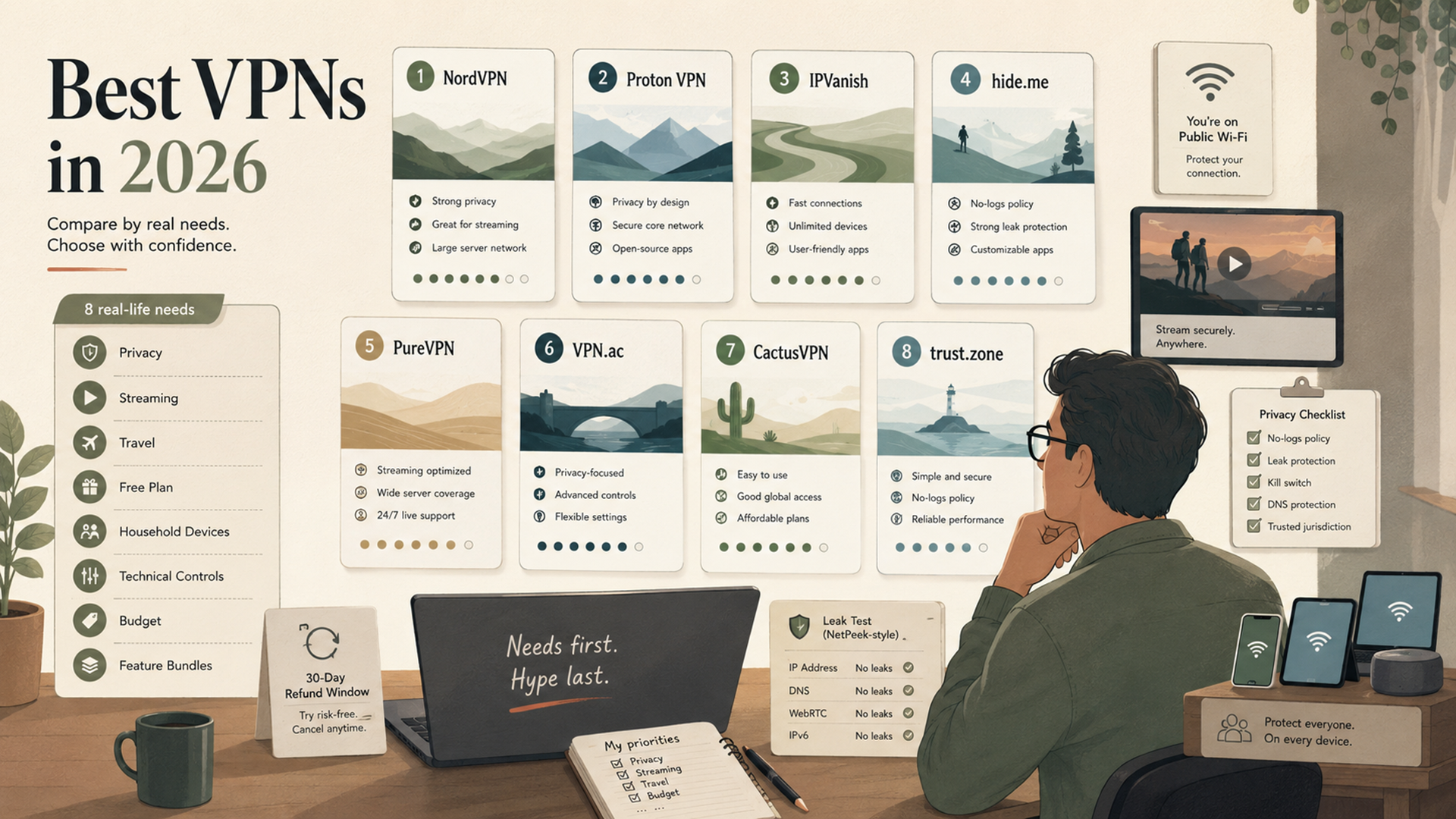
Quick verdict: the best VPNs by person
Here is the short version. If you only want one mainstream VPN for most people, start with NordVPN. If privacy philosophy matters most, start with Proton VPN. If you need unlimited household devices, start with IPVanish. If you want a real free plan before paying, start with hide.me or Proton VPN.
| Best for | VPN | Why it fits | Watch-out |
|---|---|---|---|
| Best overall mainstream VPN | NordVPN | Strong feature mix, 10 simultaneous devices, broad apps, Threat Protection features, and a 30-day money-back guarantee. | Intro pricing can renew higher; check checkout and renewal terms. |
| Best privacy-first VPN | Proton VPN | Free plan, open privacy posture, no-logs messaging, 10 paid-device connections, very large country/server footprint on paid plans, and strong ecosystem. | Some prices are dynamic on Proton’s page; verify checkout pricing. |
| Best for unlimited-device households | IPVanish | Current review data lists unlimited simultaneous connections, broad platform support, WireGuard/OpenVPN/IKEv2, and two no-logs audits. | IPVanish official pages could not be fetched in this research session; verify details at checkout. |
| Best free-plan testing VPN | hide.me | Free plan, no credit card required, unlimited free data with restricted speeds, and a paid plan with 10 connections and 91 locations. | The free plan is limited to fewer locations, one connection, and restricted speeds. |
| Best broad feature bundle | PureVPN | Low promotional pricing, tracker blocker, password manager on higher plans, optional add-ons, leak-protection features, and 31-day guarantee. | Plan tiers and add-ons can get confusing; check what is included before paying. |
| Best for technical privacy-conscious users | VPN.ac | Security-professional positioning, WireGuard support, SecureProxy browser add-on, private DNS, obfuscation, and up to 12 simultaneous connections. | Smaller network and shorter 7-day refund window than mainstream VPNs. |
| Best simple budget VPN with Smart DNS | CactusVPN | Straightforward plans, Smart DNS included, unlimited devices, audited no-logs claim, and rate-lock language. | Smaller 25-country server network than the biggest VPN brands. |
| Best basic low-cost privacy pick | trust.zone | Low long-term pricing, free trial, no-logs privacy language, WireGuard/OpenVPN/IKEv2/SOCKS5 and other protocols, and dedicated-IP add-ons. | Fewer simultaneous connections than some competitors and aggressive anonymity language should be read cautiously. |
How to choose the best VPN for your situation
Before comparing prices, decide what the VPN has to do. A VPN used for streaming on a TV, protecting a laptop on hotel Wi-Fi, keeping a whole household covered, or testing a regional website should be judged by different criteria.
| Your priority | What to check first | Best starting VPNs from this list | Why |
|---|---|---|---|
| General everyday privacy | No-logs posture, app quality, kill switch, DNS leak protection, and refund window. | NordVPN, Proton VPN, hide.me | They combine mainstream usability with privacy-focused features. |
| Public Wi-Fi and travel | Apps for every device, auto-connect, speed, server coverage, and 24/7 support. | NordVPN, PureVPN, CactusVPN | Travelers need stable apps and quick setup more than obscure controls. |
| Free VPN testing | Whether the free plan is truly free, data limits, speed limits, location limits, and privacy policy. | hide.me, Proton VPN, trust.zone | hide.me and Proton offer ongoing free plans; trust.zone offers a short free trial. |
| Streaming and content access | Streaming support language, server locations, smart DNS, TV apps, and refund policy. | NordVPN, Proton VPN, hide.me, PureVPN | Streaming reliability changes, so use refund windows and verify on your actual device. |
| Household device coverage | Simultaneous connection limit and router support. | IPVanish, CactusVPN, VPN.ac | IPVanish is the unlimited-device pick; CactusVPN advertises unlimited devices; VPN.ac allows up to 12 connections. |
| Technical controls | Protocols, DNS behavior, obfuscation, WireGuard, OpenVPN, SecureProxy, and manual setup support. | VPN.ac, hide.me, Proton VPN | Technical users should care about DNS, protocol choice, and how the browser behaves, not only headline price. |
| Budget pricing | Promotional price, renewal price, refund window, free trial, and included features. | trust.zone, CactusVPN, PureVPN | These have low advertised long-term prices, but renewal and plan details matter. |
VPN comparison table: pricing, devices, free plans, and refund windows
Pricing is a snapshot from public pages or current review data. VPN checkout pages change often, especially for discounts, renewal rates, taxes, app-store pricing, limited-time deals, and bundles. Always verify the final checkout screen before buying.
| VPN | Public pricing snapshot | Free plan or trial | Devices / connections | Refund window | Best fit |
|---|---|---|---|---|---|
| NordVPN | 2-year Basic from $3.09/mo; 1-year Basic from $4.99/mo; monthly Basic $12.99/mo. | No regular free plan shown on pricing page. | 10 simultaneous connections. | 30 days. | Best overall mainstream VPN. |
| Proton VPN | Official page shows plan features; current third-party pricing snapshot lists VPN Plus from about $2.99/mo on a 2-year plan and $9.99 monthly. | Free plan available, no credit card required. | Free: 1 device. Paid: 10 devices. | 30 days on paid plans. | Best privacy-first VPN and strong free option. |
| IPVanish | Current review snapshot lists Essential from $2.99/mo on a 2-year plan and $12.99 monthly. | 7-day mobile trial via app stores; no broad desktop free trial in current review data. | Unlimited simultaneous connections. | 30 days on new 1-year or 2-year plans. | Best for unlimited-device households. |
| hide.me | 26-month plan $2.69/mo; 12-month $4.58/mo; monthly $11.99/mo. | Free plan, no credit card required. | Paid: 10 connections. Free: 1 connection. | 30 days. | Best for free-plan testing and advanced users. |
| PureVPN | 2-year Standard promotional plan from $2.15/mo; Plus from $3.15/mo; Max from $3.55/mo. | No permanent free plan highlighted on pricing page. | Official feature page lists 9+ devices supported; order page says protect up to 10 devices. | 31 days. | Best broad feature bundle. |
| VPN.ac | Homepage says starting from $3.75/mo. | 1-week trial for $2. | Up to 12 simultaneous connections: 6 OpenVPN/IPsec plus 6 WireGuard. | 7 days. | Best for technical privacy-conscious users. |
| CactusVPN | 2-year $3.96/mo; annual $5.83/mo; monthly $15/mo. | No free trial; 30-day money-back guarantee positioned as the trial path. | Unlimited devices. | 30 days, with policy exclusions. | Best simple budget VPN with Smart DNS. |
| trust.zone | Long-term offer shown around $1.86/mo for 2 years + 6 months free; monthly $9.99. | 3-day / 1GB free trial, no credit card required. | Monthly and annual: 3 connections. Long-term promo: 5 connections. | Check current terms at checkout. | Best basic low-cost privacy pick. |
Best VPN by use case
Use this section if you already know what you need. It is faster than trying to rank every VPN by a single score.
| Use case | Best pick | Runner-up | Why |
|---|---|---|---|
| Best VPN for most people | NordVPN | Proton VPN | NordVPN has the most mainstream all-around feature mix; Proton is stronger if privacy-first branding matters more. |
| Best VPN for privacy-first users | Proton VPN | VPN.ac | Proton has a strong privacy ecosystem and free plan; VPN.ac has technical DNS and no-activity-log positioning. |
| Best VPN for households | IPVanish | CactusVPN | IPVanish is the unlimited-connection pick; CactusVPN also advertises unlimited devices. |
| Best free VPN option | hide.me | Proton VPN | hide.me has a useful free tier with unlimited data and restricted speeds; Proton Free is also credible for privacy-first testing. |
| Best VPN for streaming checks | NordVPN | hide.me or PureVPN | NordVPN is the safer mainstream pick; hide.me and PureVPN both advertise streaming-related support. |
| Best VPN for technical users | VPN.ac | hide.me | VPN.ac emphasizes private DNS, obfuscation, WireGuard, OpenVPN/IPsec, SecureProxy, and hands-on technical support. |
| Best simple budget VPN | CactusVPN | trust.zone | CactusVPN has simple rate-locked pricing and Smart DNS; trust.zone is a low-cost basic privacy option. |
| Best feature bundle | PureVPN | NordVPN | PureVPN bundles tracker blocker and optional extras; NordVPN’s Complete plan adds antivirus-style and password-manager features. |
NordVPN: best overall mainstream VPN
NordVPN is the easiest overall recommendation on this list because it fits the largest number of normal VPN buyers: travelers, streamers, remote workers, families with several devices, and users who want a familiar interface with a strong feature set.
Its pricing page shows a 2-year Basic plan at $3.09 per month with 3 extra months, a 1-year Basic plan at $4.99 per month, and a monthly Basic plan at $12.99. The page also lists a 30-day money-back guarantee and 10 simultaneous device connections. Higher plans add extras such as next-generation antivirus-style features, Dark Web Monitor Pro, ad/tracker blocking, password management, and cloud storage depending on tier.
| NordVPN strengths | NordVPN tradeoffs |
|---|---|
| Strong mainstream feature set with simple apps. | Intro prices can renew at higher annual rates. |
| 10 simultaneous connections. | Some advanced features are plan-dependent. |
| 30-day money-back guarantee. | No regular free plan on the pricing page. |
| Good fit for streaming, travel, public Wi-Fi, and everyday privacy. | Dedicated IP is an add-on rather than included by default. |
Pick NordVPN if: you want one VPN that is easy to recommend to a nontechnical person without overthinking the decision.
Proton VPN: best privacy-first VPN
Proton VPN is the best privacy-first pick. It is the natural choice for people who already trust Proton Mail, want a free VPN plan with a serious privacy brand behind it, or prefer a company that builds a broader privacy ecosystem rather than only a VPN app.
Proton’s pricing page lists a free plan with no credit card required, 1 device at a time, medium VPN speed, and servers in 10 countries selected randomly. The paid VPN Plus plan lists 10 devices, highest VPN speed, 20,000+ servers in 140+ countries, streaming support, NetShield ad/tracker/malware blocking, priority support, and a 30-day money-back guarantee. Proton’s pricing fields can display dynamically, so verify the exact checkout price before buying.
| Proton VPN strengths | Proton VPN tradeoffs |
|---|---|
| Strong privacy-first reputation and ecosystem. | Not the simplest option for users who only want a cheap streaming VPN. |
| Free plan with no credit card required. | Free plan is limited to one device and random server selection. |
| Paid plan supports 10 devices and large server/country coverage. | Some pricing display is dynamic, so checkout verification matters. |
| Good fit for privacy-conscious users, journalists, researchers, and remote workers. | Proton Unlimited may be overkill if you only need a VPN. |
Pick Proton VPN if: your first priority is privacy trust, not the lowest possible promotional price.
IPVanish: best VPN for unlimited-device households
IPVanish is the strongest pick here for households because it is known for unlimited simultaneous connections. That matters if you want to cover phones, laptops, tablets, smart TVs, and travel devices without constantly counting device slots.
IPVanish’s official pages could not be opened during research, so verify the current checkout page before buying. Current third-party review data lists IPVanish Essential at $2.99 per month on a 2-year plan, $3.89 per month on a 1-year plan, and $12.99 monthly. The same review data lists unlimited simultaneous connections, WireGuard/OpenVPN/IKEv2/IPSec support depending on platform, broad apps, and two no-logs audits in 2022 and 2025.
| IPVanish strengths | IPVanish tradeoffs |
|---|---|
| Unlimited simultaneous connections. | Official pages were not accessible in this research session, so verify current claims at checkout. |
| Good fit for families and many-device users. | U.S.-based VPN, which some privacy-first users may avoid. |
| WireGuard/OpenVPN/IKEv2 support is listed in current review data. | Streaming support may not be as polished as the top mainstream streaming picks. |
| 30-day guarantee on new 1-year and 2-year plans in current review data. | Short mobile app-store trial is not the same as a broad free plan. |
Pick IPVanish if: you want one VPN account for a large household or many devices and are comfortable verifying the current official checkout terms yourself.
hide.me: best free-plan testing VPN
hide.me is one of the best options if you want to test a VPN without paying first. Its pricing page lists a free plan with no credit card required, unlimited data, restricted speeds, 8 locations, 1 connection, and no-logs language. The paid plan lists unlimited data traffic, 91 locations, 2,600 servers, 10 simultaneous connections, no logs, fixed IP address, streaming support, and dynamic port forwarding.
Paid pricing on the page shows $11.99 monthly, $4.58 per month on a 12-month plan, and $2.69 per month on a 26-month plan, each with a 30-day money-back guarantee.
| hide.me strengths | hide.me tradeoffs |
|---|---|
| Useful free plan with no credit card required. | Free plan has restricted speeds, fewer locations, and only one connection. |
| Paid plan includes 10 connections, streaming support, and dynamic port forwarding. | More advanced settings can feel busy for beginners. |
| 30-day money-back guarantee. | Longer plan pricing changes the value calculation. |
| Good fit for users who want to learn before paying. | Free users should not expect premium streaming or high-speed downloads. |
Pick hide.me if: you want a real free VPN plan and a paid upgrade path with strong technical options.
PureVPN: best broad feature bundle
PureVPN is the feature-bundle pick. Its pricing page separates Standard, Plus, and Max plans, with promotional 2-year pricing shown at $2.15 per month for Standard, $3.15 per month for Plus, and $3.55 per month for Max. The page also lists extras such as tracker blocker, password manager on higher tiers, data removal, dark web monitoring, eSIM on Max, and dedicated IP add-ons.
PureVPN’s feature page lists split tunneling, kill switch, 256-bit encryption, obfuscation servers, quantum-resistant encryption, IPv6 leak protection, DNS leak protection, WebRTC leak protection, unlimited bandwidth, 24/7 support, 6,000+ servers, 96+ locations, 78+ countries, 9+ supported devices, and a 31-day money-back guarantee. Its no-log assessment page says PureVPN does not log origin IP, assigned VPN IP, connection time, or user activity after connecting.
| PureVPN strengths | PureVPN tradeoffs |
|---|---|
| Broad feature bundle and add-on catalog. | Plan tiers can be confusing if you only want a simple VPN. |
| Low promotional pricing on long plans. | Renewal prices and add-ons need checkout verification. |
| 31-day money-back guarantee. | Some features are tied to higher tiers. |
| Good fit for users who want VPN plus tracker blocker, password manager, or dedicated IP options. | Privacy-first users may prefer Proton VPN or VPN.ac. |
Pick PureVPN if: you want a VPN bundled with extra identity, tracker, password, and dedicated-IP options.
VPN.ac: best VPN for technical privacy-conscious users
VPN.ac is the most technical-feeling VPN on this list. Its homepage says the service is built by security professionals and starts from $3.75 per month. It advertises multiple protocols and encryption types, elliptic-curve cryptography, AES-GCM, obfuscation, WireGuard support, no activity logs, no speed limit, SecureProxy browser add-on, secure DNS implementation, apps for Windows, macOS, iOS, and Android, and up to 12 simultaneous connections.
VPN.ac is smaller than mainstream consumer VPNs, with 21 VPN countries and 32 SecureProxy countries listed on the homepage. It offers a 1-week trial account for $2 and a 7-day full refund policy.
| VPN.ac strengths | VPN.ac tradeoffs |
|---|---|
| Strong technical feature language: WireGuard, obfuscation, private DNS, SecureProxy. | Smaller country footprint than NordVPN, Proton VPN, or hide.me. |
| Up to 12 simultaneous connections. | Only 6 of those are WireGuard, based on its own FAQ split. |
| Direct security-team support positioning. | Less beginner-polished than mainstream VPNs. |
| $2 trial and 7-day refund policy. | Refund window is shorter than 30-day mainstream guarantees. |
Pick VPN.ac if: you understand VPN protocols and care about DNS, obfuscation, SecureProxy, and technical control more than the largest app ecosystem.
CactusVPN: best simple budget VPN with Smart DNS
CactusVPN is the simple budget pick. Its pricing page shows monthly service at $15 per month, annual service at $5.83 per month, and a 2-year plan at $3.96 per month. It also says Smart DNS is included, unlimited devices are included, the server network covers 25 countries, the no-logs claim is independently audited by Securitum, and plans include a 30-day money-back guarantee with policy exclusions.
The most interesting part is the renewal language. CactusVPN says the price you start with is the price you keep for as long as the subscription remains active and in good standing. That makes it easier to evaluate than VPNs with deep intro discounts and large renewal jumps.
| CactusVPN strengths | CactusVPN tradeoffs |
|---|---|
| Simple pricing and rate-lock language. | Smaller 25-country server network. |
| Smart DNS included. | Not the strongest pick if you need the biggest VPN server network. |
| Unlimited devices. | Monthly price is higher than some competitors. |
| Independently audited no-logs claim. | Refund policy has exclusions, including crypto payments and unsupported use cases. |
Pick CactusVPN if: you want a simple VPN plus Smart DNS with clear long-term pricing and unlimited devices.
trust.zone: best basic low-cost privacy pick
trust.zone is the low-cost basic privacy pick. Its order page shows a monthly plan at $9.99, a long-term promotional plan around $1.86 per month for 2 years plus 6 months free, and a 3-day / 1GB free trial with no credit card required. The homepage lists protocols and options including WireGuard, OpenVPN, L2TP, PPTP, SSTP, IKEv2, SOCKS5, HTTPS proxy, VLESS, ShadowSocks, kill switch, no logging, unlimited speed, and unrestricted P2P traffic.
Its privacy policy says Trust.Zone servers do not store log files and that it could not associate certain requests with customer identity because it stores no connection logs. Read that as a privacy claim, not a guarantee of total anonymity. The website uses strong anonymity language, but every VPN should still be treated as a routing and encryption tool, not an invisibility tool.
| trust.zone strengths | trust.zone tradeoffs |
|---|---|
| Very low long-term promotional pricing. | Monthly and annual plans list fewer simultaneous connections than unlimited-device VPNs. |
| 3-day / 1GB trial with no credit card required. | Free trial is short and data-limited. |
| Broad protocol list including WireGuard, OpenVPN, IKEv2, SOCKS5, and ShadowSocks. | Protocol abundance can confuse beginners. |
| Dedicated static IP and DDoS add-ons available. | Add-ons change the total cost. |
Pick trust.zone if: you want a low-cost VPN, a short no-card trial, and basic privacy tooling without paying for a large mainstream bundle.
Pricing notes: why the cheapest VPN is not always the best deal
VPN pricing is messy because providers use intro discounts, renewal jumps, long-term deals, app-store billing differences, bundles, add-ons, and regional taxes. A $2.15/month plan may be the cheapest headline price, but it may not be the best fit if you need unlimited devices, a free plan, a shorter commitment, or a more privacy-focused policy.
| Pricing question | Why it matters | What to check before paying |
|---|---|---|
| Is the price introductory? | Many VPNs renew at a higher price after the first term. | Look for renewal price, not only the promo monthly equivalent. |
| How long is the commitment? | Two-year and three-year deals look cheap but lock up more money upfront. | Compare monthly, annual, and long-term totals. |
| What is included? | Some plans include password managers, cloud storage, eSIM, or data removal; others are VPN-only. | Do not pay for extras you will never use. |
| What is the refund window? | A 30-day guarantee gives more room to test streaming, travel, and device compatibility than a 7-day window. | Check refund exclusions, especially crypto payments and app-store billing. |
| Does the plan support enough devices? | A cheap plan can become annoying if it only covers one or three devices. | Count phones, laptops, tablets, TVs, routers, and travel devices. |
| Are add-ons needed? | Dedicated IP, port forwarding, static IP, and advanced identity features can change the total cost. | Price the actual setup, not only the base VPN. |
For most people, the practical starting point is not the cheapest VPN. It is the cheapest VPN that does the job reliably and has a refund path if it fails on your device or streaming service.
What a VPN can and cannot do for privacy
A VPN can encrypt traffic between your device and the VPN server. It can hide your home IP address from websites. It can help on public Wi-Fi. It can make your traffic appear to exit from another region. Those are real benefits.
But a VPN does not make you anonymous. Websites can still use cookies, logins, browser fingerprinting, payment data, device identifiers, behavior patterns, and account history. Your VPN provider can still see that your account connected to a VPN server. Your employer, school, or platform may prohibit VPN use. A VPN also does not make illegal or rule-breaking activity acceptable.
| VPN helps with | VPN does not solve by itself |
|---|---|
| Hiding your real IP address from normal websites. | Browser fingerprinting, cookies, login identity, and account history. |
| Encrypting traffic between your device and the VPN server. | Tracking after you log into Google, Amazon, social platforms, or work tools. |
| Protecting you on public Wi-Fi from local network snooping. | Malware, phishing, weak passwords, or compromised devices. |
| Changing your visible region for allowed travel or testing use cases. | Bypassing platform rules where VPNs are prohibited. |
| Reducing ISP visibility into visited domains and traffic patterns depending on DNS and protocol setup. | Total invisibility from every network observer or website. |
If you use a VPN for privacy, also think about your browser. Jivaro’s browser fingerprinting guide explains why IP changes alone do not stop tracking. If you need separate browser sessions for client work, research, QA testing, or proxy/VPN comparisons, Instanciar is relevant because session isolation matters as much as the network route.
Test your VPN before you trust it
After installing a VPN, do not assume everything is clean. Run a leak check. Your visible IP may change, but WebRTC, DNS, timezone, language, browser profile state, and fingerprint signals can still expose mismatches.
Use NetPeek to check visible IP, WebRTC, DNS/browser clues, proxy/VPN mismatch, and fingerprint signals. Then compare the results with the VPN server and region you intended to use.
| After connecting a VPN, test… | Why | What a mismatch can mean |
|---|---|---|
| Visible IP | Confirms whether websites see the VPN exit IP. | VPN is disconnected, split tunneling is active, or the wrong app/browser is routed. |
| DNS behavior | Checks whether DNS resolution aligns with the VPN. | DNS requests may be going to your ISP or another resolver. |
| WebRTC | Detects browser-exposed network candidates. | Browser settings or extensions may expose non-VPN network information. |
| Timezone and language | Compares browser signals with the VPN region. | The network route changed but browser identity did not. |
| Cookies and storage | Old browser state can identify you regardless of IP. | You need a clean profile, Incognito check, or isolated session. |
A clean leak test is not proof of anonymity. It is proof that the obvious visible pieces line up better than before. For proxy-heavy workflows, also read Jivaro’s best affordable proxy providers guide and the browser fingerprinting test guide.
Common VPN buying mistakes
The worst VPN purchase is not the expensive one. It is the one that solves the wrong problem.
| Mistake | Why it hurts | Better approach |
|---|---|---|
| Buying only by lowest monthly equivalent | The cheapest long-term plan may not fit your devices, refund comfort, or privacy goals. | Compare total cost, renewal rate, device limit, and refund terms. |
| Assuming every VPN is anonymous | VPNs can still be tied to accounts, payments, logs, cookies, and browser fingerprints. | Use VPNs as privacy tools, not invisibility tools. |
| Ignoring device limits | Families and multi-device users can hit connection caps quickly. | Choose IPVanish, CactusVPN, VPN.ac, or a router setup if device count matters. |
| Not testing streaming before the refund window ends | Streaming support changes often and can vary by device. | Test the exact service and device before the refund deadline. |
| Confusing VPNs with proxies | A VPN usually routes device traffic; proxies are often better for per-browser or per-app routing. | Read a proxy vs VPN comparison before choosing for QA, scraping, or browser profiles. |
| Skipping leak tests | DNS, WebRTC, or browser signals can contradict the VPN route. | Run NetPeek after setup and after major setting changes. |
| Using a VPN where a platform prohibits it | Even a technically clean setup can violate terms. | Follow platform, employer, school, and local rules. |
FAQ
Sources and official pricing pages
- CactusVPN pricing and features
- hide.me pricing and plan comparison
- NordVPN pricing and plan comparison
- NordVPN no-logs audit background
- Proton VPN pricing and plan comparison
- Proton VPN no-logs audit page
- PureVPN order and pricing page
- PureVPN features page
- PureVPN no-log assessment page
- trust.zone homepage
- trust.zone pricing page
- trust.zone privacy policy
- VPN.ac homepage
- VPN.ac features page
- VPN.ac FAQ
- IPVanish current pricing/features review snapshot
The best VPN is the one that fits your actual risk, device count, travel habits, and budget. Start with the use case, not the discount. Then test the VPN before the refund window closes.
