
Instanciar
Jivaro Apps
Instanciar
A portable Windows app for launching and managing isolated Chromium-based browser instances.
Instanciar is built for separated browser workflows: client accounts, testing, remote work, compartmentalized browsing, profile separation, and proxy-supported launches where appropriate.

What it does
Separate browser work without juggling profiles manually
Instanciar focuses on practical browser compartmentalization. It is not a guarantee of anonymity, security, or platform permission. Use it only where browser automation, proxies, and separated sessions are allowed.
Isolated sessions
Keep browser instances separated so cookies, local data, and session context do not overlap unnecessarily.
Chromium workflows
Launch and manage Chromium-based browser instances for testing, client work, and separated browsing tasks.
Proxy-supported launches
Use proxy-supported browser launches for location-aware testing, compartmentalized browsing, and workflow separation.
Portable setup
Keep the tool portable and lightweight instead of building an entire browser-management stack around one task.
Workflow
How Instanciar fits into a browser workflow
The goal is simple: create a clean instance, keep its browser context separate, and launch it when that workflow is needed.
Create instance
Set up a separate browser instance for a specific task, client, account group, or testing scenario.
Choose browser
Use a Chromium-based browser executable for the instance workflow.
Add proxy if needed
Apply proxy settings when the workflow requires it and when you are allowed to do so.
Launch
Open the browser instance without manually rebuilding the same profile setup every time.
Keep separated
Use distinct instances to reduce accidental data overlap between unrelated workflows.
Use cases
Built for separated browser tasks
Instanciar is most useful when one browser profile is not enough and constantly switching profiles becomes messy.
Website testing
Test sites, logins, forms, flows, and browser behavior in separate sessions without mixing everything into one profile.
Client workflows
Keep client-related browser work separated, especially when tasks involve different dashboards, accounts, or environments.
Remote work
Create cleaner separation between workspaces, tools, accounts, and browser-based work routines.
Compartmentalized browsing
Separate browsing contexts to reduce accidental overlap between unrelated sessions and tasks.
Location-aware testing
Use proxy-supported launches for legitimate testing workflows where regional behavior matters.
Social media management
Manage approved client or business workflows with separated browser environments where platform rules allow it.
Testing and privacy workflows
A cleaner way to launch separated browser environments
Instanciar can support privacy-conscious and testing-focused workflows by keeping browser instances separated and allowing proxy-supported launches. It does not guarantee anonymity, security, anti-detection, or platform compliance.
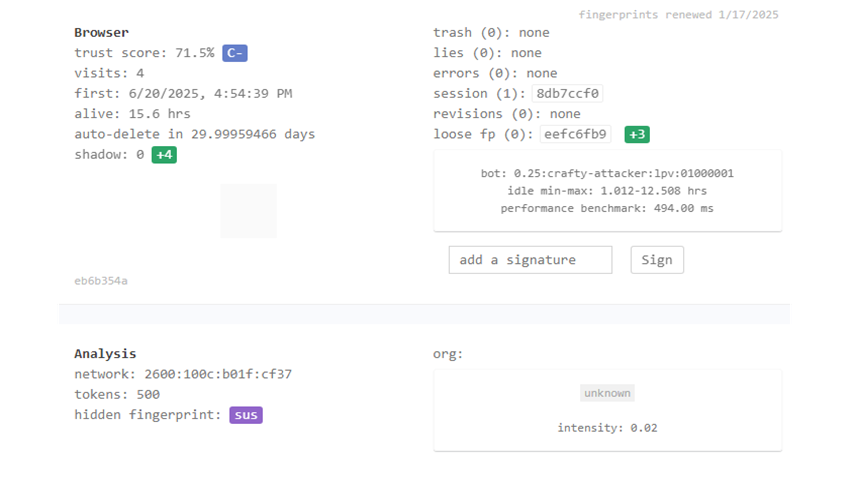
Treat browser scoring tools as diagnostics, not promises. They can help you understand a configuration, but they do not replace responsible use, secure browsing habits, or platform rules.
Download
Get the latest version
The newest release is highlighted first. Older versions are available below in a compact archive.
Instanciar for Windows
Portable Windows executable for Chromium-based browser instance workflows. Download only from Jivaro or official Jivaro download links.
Security note: download software only from trusted Jivaro links. If a third-party site mirrors Instanciar, treat it as unverified.
Older versions archive Use only if you specifically need an older build.
| Version | Operating System | Download Link |
|---|---|---|
| 0.10 | Windows | Download v0.10 |
| 0.09 | Windows | Download v0.09 |
| 0.05 | Windows | Download v0.05 |
| 0.03 | Windows | Download v0.03 |
Responsible use
Use Instanciar only where separated sessions and proxy workflows are allowed
Instanciar is a browser workflow utility. Do not use it to violate platform rules, impersonate users, evade enforcement, bypass security controls, scrape without permission, commit fraud, spam services, or automate activity where you do not have authorization.
FAQ
Quick answers
A few notes before downloading or using Instanciar.
What kind of browser does Instanciar use?
Instanciar is designed for Chromium-based browser workflows.
Does Instanciar guarantee privacy or anonymity?
No. Instanciar helps manage separated browser instances and proxy-supported launches, but it does not guarantee anonymity, privacy, security, platform compliance, or anti-detection results.
Does Instanciar require installation?
Instanciar is presented as a portable Windows executable, so it is designed to run without a full installer workflow.
What operating system is supported?
The listed downloads are for Windows.
Where should I report bugs or issues?
Use the Jivaro Contact page and include the Instanciar version, your Windows version, what happened, what you expected, and steps to reproduce the problem.
